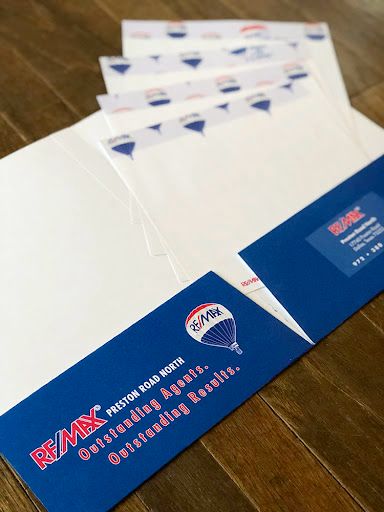
Stay organized and impress clients with custom Presentation Folders. Printed on high-quality cardstock and tailored with business branding, these folders are perfect for meetings, proposals, and marketing kits. Add pockets, business card slits, and custom finishes for a polished, professional look.
Make your business presentations, client handouts, or event materials stand out with custom Presentation Folders. Designed for functionality and style, these folders hold important documents neatly while showcasing your brand with full-color printing and finishing options.
Choose from multiple paper stocks, pocket configurations, and finishes like matte or gloss. Add business card slits for easy networking, or pair them with matching Letterhead and Business Cards to build a complete business identity kit.
| Feature | Description |
|---|---|
| Folder Size | 9″ x 12″ (standard) or custom sizes available |
| Pocket Configuration | One or Two Pockets (each 4” deep) |
| Paper Stock Options | 14pt Coated, 16pt Gloss Cover, or Uncoated Matte |
| Printing | Full-color CMYK – Outside or Both Sides |
| Coating Options | Gloss AQ, Matte AQ, UV High Gloss |
| Slit Options | Standard Business Card Slits (horizontal or vertical) |
| File Type | Print-ready PDF with bleed and safe zones |
| Quantity Range | 100 to 5,000+ folders |
| Turnaround Time | 4–6 Business Days |
| Shipping | Standard & Express Shipping Available |
Printed Presentation Folders are a go-to solution for maintaining a professional image and improving brand recall during in-person meetings or marketing distribution.
The standard size is 9″x12″, which comfortably fits 8.5″x11″ documents.
Yes, both the inside and outside of the folder can be printed in full color.
You can choose one or two pockets and add slits for inserting business cards.
We recommend PDF with bleed and safety margins. Our team offers free file checks before production.
You can choose between Gloss AQ, Matte AQ, or UV coating for extra shine and durability.
Standard production time is 4–6 business days depending on quantity and options.
Yes. We support custom sizing based on your specific needs. Contact our team for help.
Yes, the minimum is typically 250 folders.
Pair them with Postcards and Calendars to complete your brand presentation package.
Currently, we ship across the U.S. and Canada. For special international orders, please reach out to support.
Ensure that the file meets the required dimensions for the product. Create the artwork in CMYK color mode at 300 dpi resolution, with a 1/16 inch bleed on all sides to prevent unwanted white edges after trimming.
Embed all images within the file, and convert all text to outlines to avoid font issues during printing.
Export the final design as a PDF with bleeds to ensure accurate printing results.